

A restaurant text club starts with a clear invitation and a guest's choice to join. The QR code opens the signup page; it does not subscribe the person. After any required confirmation, an approved welcome message can explain the reward. Later campaigns go only to eligible subscribers who have not opted out.
This guide is for a promotional guest list, not a QR menu, ordering system or reservation desk. Restaurant SMS platforms already offer signup and campaign tools. The work is choosing a useful offer, setting up the path, assigning an owner and reviewing what actually happened.
Start with four editable planning files
- Table-tent insert layout (editable SVG): a 4-by-6-inch face with editable text and a clearly labeled QR placeholder. Open it in an SVG editor or edit the source.
- Signup and launch checklist (TXT): assign responsibilities, record the offer and rehearse the guest and staff steps.
- Illustrative month of campaigns (CSV): adapt the planning rows in a spreadsheet; no campaign is scheduled by downloading it.
- Blank campaign results worksheet (CSV): keep signup, delivery, redemption and verified repeat purchase separate.
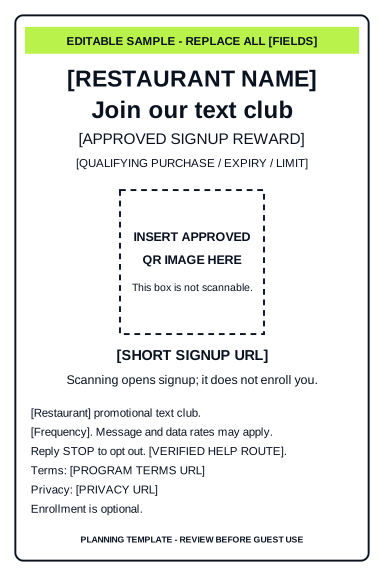
All four files are templates. They contain placeholders, not customer records, a working signup form or a scannable QR code. Replace every bracketed field, review the program wording and insert a real code for the approved signup URL before printing. The SVG is one insert face for a table holder; confirm the holder size and print at actual size.
1. Choose an offer staff can explain and afford
Pick one signup reward with clear dates, eligible items, qualifying purchase, redemption limit and exclusions. Work out the reward cost before choosing it. A free item that strains the kitchen or erases the contribution from a visit is not a useful acquisition plan.
For a fictional Example Bistro, the planning idea might be a house dessert with two dinner entrées. That is an illustrative offer, not a recommendation for your margins. The owner supplies the final terms; the shift lead teaches staff how to record it. Decide how repeat signups and an unavailable item will be handled before guests ask.
| Role | Owns | Before the next step |
|---|---|---|
| Restaurant owner | Offer economics, stock, dates and audience approval | Signs off the exact offer and message |
| Campaign operator | Agreed setup, scheduling, list exclusions and delivery review | Records approval and checks recipient eligibility |
| Shift lead | Staff briefing and redemption records | Confirms the team can honor the offer |
| Guest-contact owner | Questions through a verified contact route | Confirms monitoring hours or the published alternative |
On a narrow screen, swipe the table sideways. One person may hold several roles; each role still needs an owner.
2. Plan the signup page before generating the QR
Give the guest a short path they can understand on a phone. The table tent should name the restaurant and describe the text club; keep menu and ordering codes visibly separate.
- Required input: mobile number and a separate, unchecked choice for the disclosed promotional program. Do not preselect it.
- Optional input: name for personalization and birthday month/day only if an agreed birthday campaign needs it. Do not require unrelated details to join.
- Visible program information: sender identity, message purpose and expected frequency, relevant rates notice, opt-out and help instructions, and the restaurant's program terms and privacy links.
- State after submission: explain whether the guest still needs to confirm, is subscribed, or was already on the list. An error must not look like a completed signup.
- Stored evidence: record the signup source, timestamp, wording version, permission and confirmation state, and subsequent opt-out state in the approved system.
Twilio's messaging policy requires prior express written consent for promotional messages, identifiable senders and accessible opt-out handling. After withdrawal, further messages are prohibited apart from a final confirmation unless the person gives fresh consent. This describes Twilio's requirements, not a claim that our offer uses Twilio or that this template guarantees legal compliance.
Providers can require an additional confirmation step. SlickText requires double opt-in for its web forms; its form guide distinguishes submitted details from completed subscription. Match the live screen, welcome trigger and list status to the selected provider. Provider guidance checked September 29, 2026; final wording and configuration require review for the actual program.
The Efficient Automate restaurant offer does not import purchased lists, old booking lists or POS exports. Existing guests can choose to join through the new signup path. A prior reservation or a scan of the menu code is not enrollment in this text club.
3. Test the full path before printing a batch
- Open the approved signup URL on a phone and with a keyboard. Check field labels, readable wording, terms links and useful errors.
- Using authorized test details, verify that an unchecked permission choice cannot enroll a guest. Check any required confirmation, duplicate signup and invalid-number paths.
- Confirm that the eligible welcome message uses the right restaurant, reward and contact route. Record failed or pending delivery instead of promising an instant arrival.
- Test opt-out handling and exclusion from later campaigns and automations. Test an ordinary reply separately; an opt-out response does not prove that guest questions reach staff.
- Generate the real QR for the approved URL, insert it into the layout and scan a physical proof under table lighting. Retest if the URL, artwork or size changes.
- Give staff the final terms and redemption steps, then record who approved launch and who can pause the program.
The downloadable layout intentionally contains no code. A visible short signup URL is a useful alternative for someone who cannot scan. Keep its destination current for as long as the printed tents remain in use.
4. Plan a month without treating weekly sends as a quota
This is an illustrative four-week plan for Example Bistro. Replace the timing, offer, audience and owner before approval. The current managed offer allows about one promotional send per week at useful hours, never late at night; that ceiling is not a recommendation to send every week. Check welcome and birthday activity before adding another promotion to the same guest.
| Week | Plan | Illustrative wording or action | Approval check |
|---|---|---|---|
| 1 | Launch and eligible welcome | “[Restaurant] VIP: Thanks for joining. [Approved reward and terms link]. Reply STOP to opt out.” | Send only after the provider's signup requirements are met; verify voucher handling. |
| 2 | One quieter-shift offer | “[Restaurant]: [Offer] on [dates]. Show [code] before paying. [Terms link]. Reply STOP to opt out.” | Owner confirms cost and stock; shift lead briefs staff. |
| 3 | Review; no planned promotion | Inspect failures, opt-outs, redemptions and staff feedback. | Fix unclear terms or delivery problems before continuing. |
| 4 | Optional event invitation | “[Restaurant]: [Event] on [date/time]. [Verified booking or details link]. Reply STOP to opt out.” | Skip if there is no useful event, verified destination or suitable audience. |
These incomplete examples need the actual provider's required wording and the restaurant's approval. They are not ready-to-send campaigns.
Budget recipient sends and billable units, not just the number of campaigns. Welcome, confirmation, birthday and other traffic may affect usage under the provider's rules. Use the existing message-budget calculator and confirm what counts toward the included allowance.
5. Review activity and visits as different results
The results CSV starts with a blank row. Leave a value blank when it is unknown; enter zero only when the records establish zero. It is an aggregate planning file, so do not add guest names, phone numbers or private message content.
- Completed signups: people who finished the agreed enrollment process during the period; not scans or unfinished forms.
- Message activity: attempted recipient messages, provider-reported delivery, failures, pending or unknown status, and opt-outs. Record the provider's units and status definitions.
- Redemptions: offers staff actually recorded against a campaign. A delivered message is not a redemption.
- Verified repeat purchases: recorded purchases by guests whose prior purchase can be established through an approved method. Mark unverified history separately.
- Incremental result: a different question requiring an appropriate comparison and actual costs. A repeat buyer or redemption does not prove the message caused an extra visit.
After each send, the campaign operator reviews delivery and exclusions, the shift lead reconciles redemption records, and the owner approves the next action. Keep evidence references and limitations alongside the numbers. If the POS cannot support a reliable match, report the known activity rather than filling the gap with an estimate.
Where the managed service helps
If your existing tools work and your team can run this process, use them. Our separately scoped restaurant service handles the agreed signup setup, campaign copy and scheduling, list management and delivery monitoring. The restaurant still approves offers, trains staff and owns guest-service decisions. No automatic POS integration or staffed reply desk is assumed.
The published restaurant offer is $500 setup and $297/month for the first three restaurants, retained while active, with a three-month minimum and 1,000 texts per month. The standard rate afterward is $397/month; additional usage passes through at carrier cost without markup. Review the usage boundary and full-cost worksheet before deciding. This article and its examples are not restaurant customer results.